iPhone / iPad / Mac

Downgrading iPhone 3.0 firmware 7A341 back to 2.2.1..

If you’re like me and you fart about with things when you shouldn’t, then you may have upgraded your iPhone to the illicit Beta release of the 3.0 firmware.  The one I installed was the ‘Gold Master’ version (7A341), and it worked like a charm.  However, it occurred to me that iTunes might get the hump with me when it releases the proper version on the 17th, so I’d better downgrade.

You would think that is simple, wouldn’t you?  Well, after a bit of hair-tearing out and no small amount of using Google, I seem to have managed it, so I thought I’d make a note on here for any other folks who are struggling as I was.  Of course, after all this, iTunes might just upgrade over any Betas without any complaint, but we can’t be sure.

The process is quite simple, but quite fiddly.  These are the steps I followed to downgrade my iPhone 3G.  I don’t have a 2G or a Touch either 1 or 2G to test this on, so no promises that will work!  You will need to have the 2.2.1 Firmware (this link is the 3G version), you might also need to have a copy of  QuickPWN on standby.

Sorted? Okay, here are the relatively few steps you need to take:

1. Open up iTunes.
2. Get your phone in DFU mode – this ISN’T the same as when it displays a plug and an iTunes symbol – follow this guide if you’re not sure.
3. Hold down shift and click on the restore button, select the 2.2.1 Firmware file.  This might just work, apparently – it didn’t for me (it goes on for a while before failing, and for me giving an error 1013).  If you error, carry on.
4. Allow the phone to reboot.
5. Close iTunes.
6. Launch QuickPWN.exe, it will advise you to hold power and home for 15 seconds, then press power for 2 second – do this.
7. If you’ve done it right you’ll get the ‘slide for emergency’ message as well as the USB and iTunes graphic.
8. Open iTunes and it will activate. Woohoo!

Obviously you’re then free to re-jailbreak or whatever else 🙂
Categories: Blog, iPhone / iPad / Mac | 7 Comments

Useful…

This site might be interesting for people who own iPhones or iPod touches.  You don’t even need to be able to speak Russian!

🙂

Categories: iPhone / iPad / Mac | Leave a comment

Jailbreaking 2.1 with Windows for impatient types..

I just followed these instructions and managed to upgrade my iPhone to the 2.1 firmware, and then jailbreak it again to be able to fart around with the themes and install third party applications – woohoo!  Impatient non-Mac users such as myself currently don’t have an easy application-driven solution for jailbreaking within Windows, you see.  Well, it’s quite easy.

* I’ve now fixed the above link so it doesn’t point to a football forum!! Apologies.

I didn’t bother downgrading iTunes back to 7.7, keeping 8 worked absolutely fine.  It had a little wobble after upgrading to 2.1 using iTunes bizarrely, which culminated in my losing patience and restoring to a backup – which wasn’t too arduous.  The biggest drawback was having to reinstall all the non-legit applications – obviously the AppStore ones were backed up neatly in iTunes – not so for the Cydia and Installer ones.  Booo!

Although now I have it jailbroken and working, it’s taking a while to sync all my music and videos back onto it!  Deep joy!  Still, I can have a play with ‘genius’ playlists now!  Fun fun fun!  Hopefully (although I’m not counting too many chickens) Apple have addressed the issue that means my car’s bluetooth kit doesn’t download the addressbook on the phone too.  Works fine on an original iPhone, but since upgrading to 3g it’s not worked.

Categories: iPhone / iPad / Mac | Leave a comment

Flickr me this, Flickr me that..

I’ve had a Flickr account for ages, but never really used it much; but noticed that I can upload pics to it easily on the go from my iPhone, and can install a handy block over there –> to display some recent ones, which is rather good.. I used to be a big user of photos on t’internet, with regularly updated galleries – and frankly, I’ve been very slack on that lately (although ‘event’ photos do tend to make it onto Facebook!).

So there you go!  A slight change, but a good one I think.  I suppse it depends if I ever use it regularly, hopefully I will, though!

In terms of non-iPhone related things (since that’s all I seem to write about!), the house is still a building site.  With much elbow grease from myself, Cat, Mum and Dad we’ve got the downstairs mostly unpapered.  This week’s been a bit busy in the evenings, so hopefully on Saturday/Sunday I’ll be able to finish off by spongeing down the walls and getting the remaining bits of paper off, clean out the areas that require filling, do the filling and then make use of a power sander (yay, powertools!) to smooth everything off.

Hopefully that will leave us with a surface suitable to paint without reskimming; we shall see!  Either way, we won’t be having wallpaper since our little winged pincers like nibbling it!  The very loud fans the dryers left us are still running; they’re coming on friday to see if we still need them – I’m hoping not, as we can’t really do any work until they’re gone, I’m also needing to get in touch with a plumbing pal to discuss what we can do about replacing our heating with something more practical.

If I didn’t have a pretty hectic day job it would be easy!  Still, no pain no gain.

Categories: Blog, iPhone / iPad / Mac | Leave a comment

Oooh, look what I can do now!

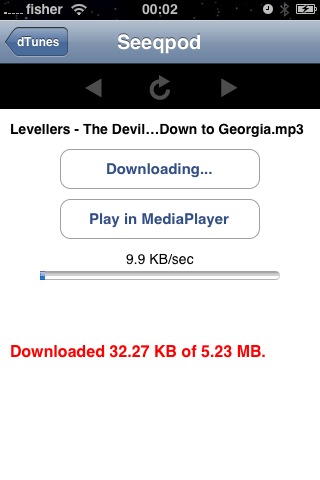
Okay, my earlier comments around the potential pointlessness of jailbreaking an iPhone are null and void after I discovered dTunes, an application which *ahem* allows you to locate music you already legally own and download it, there and then.  It can play it too, unfortunately the music isn’t available in your iPod functionality, but it’s easy enough to listen via the inbuilt music player and then once you’re at your PC or Mac retrieve the music and import it into iTunes as usual.

Very impressed indeed!  And as you can see, it even found a Levellers B-Side, so it’s not doing too badly at all on that front!

It is perfect for those times when you’re out and about and randomly think of a tune (or perhaps hear it, then use Shazam to identify it), but have forgotten it by the time you’re in a position to do anything about it… so anyway, yes, installed, tested, very impressed.  Get yourself on Cydia and install it!

Categories: Blog, iPhone / iPad / Mac, Levellers | 2 Comments

iPhone 2.02 jailbreak and shenanigans..

I had a while back decided I wasn’t too arsed about jailbreaking my iPhone, but well, as I oft do with technology I got a little bored and decided to do it anyway, having discovered that you could do it with a tool called QuickPWN.  Instructions on doing it are understandably sketchy, as developers tend to specialise, funnily enough, in developing rather than user-friendly instructions – plus their target audience tend to be people who can easy out-geek me.

So, amidst fears that in upgrading to 2.02 I had missed the jailbreaking boat, I duly opened up Google which presented me with this really useful guide.  These are the instructions I followed, and it worked.  The only thing they were not clear on was the length of time it can take for restarts – so it does lead to a few spincter-twitching moments; however, I was spurred on by the (as yet untested for me) claims that even if it went horribly wrong, a simple restore via iTunes would sort it out.

Why would you want to jailbreak your phone?  With the inception of AppStore, third party applications are now available anyway (sometimes for a price), however, Apple are less keen on other applications making it onto their beloved platform.  Video recording, for instance – is something my iPhone can now do, thanks to an application called Cycorder.

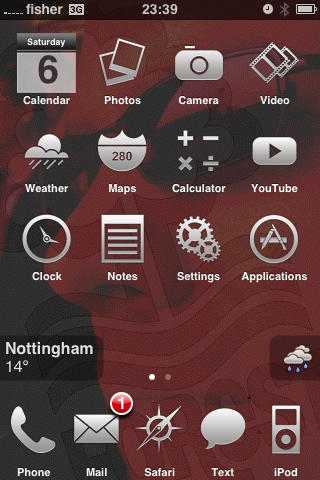
The other thing that jailbreaking enables is customisation; now, there is a school of thought that points out – not unreasonably – that the iPhone environment was a rather attractive thing to behold, and thus shouldn’t be tampered with.  And I agree with that, to a point.  But I resent being enforced not to, so I do actually quite like the ability to tamper with things; which as you can see from the screenshot are considerably tampered with.

In the past I used to spend many happy an hour designing themes for Geeklog, given the relative simplicity of iPhone themes I could be quite tempted to try to get into designing stuff again.  As it is so far I’ve restricted myself to hacking apart the work of others into something approximating what I would like – I’ve also been investigating how to achieve transparencies in PNG files, which I think could lead to intriguing results; I like the idea of making the buttons fairly blended in.

Other things I’ve amused myself with is installing an application called ‘Categories’ which allows you to create folders in which to put groups of applications; which has tidied up my ‘Springboard’ (the technical term for the iPhone menu system), I’ve installed pretty impressive NES and Gameboy Advance emulators, as well as a more advanced Camera program, and a Video recorder.  It’s true to get the most out of these things you need to be comfortable using either SSH or WinSCP (for Microsoft-based people such as myself) to get full use out of them.

In an extension of theme type stuff, I’ve also just added a small weather ‘widget’ to the home screen, as well as changing things like the battery colour and changing the slider to a zip, using the ‘Winterboard’ application, and the language to say ‘unzip’ rather than ‘slide- using the ‘Customize’ application (which has also enabled me to change my SMS alert tone to a light saber.. ah, t’was inevitable!).  So yes, a myriad of customisations and changes, many of which I will probably lose when the novelty wears off!

Categories: Blog, iPhone / iPad / Mac | 5 Comments

Useful!

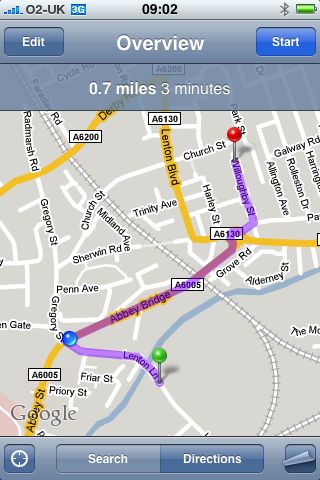
I’ve got a couple of hours to kill, having dropped of my car at the garage; hmm, I think to myself, I don’t know Lenton very well, where’s the nearest greasy spoon to get me some breakfast?

iPhone to the rescue! Making use of the Vicinity application, I asked for a café near me, and it duly obliged an easily walkable example complete with integration into Google Maps, providing my start point, my destination and current location en route!

So now I’m arsing around posting this whilst supping a nice cup of tea!

photo

Categories: Blog, iPhone / iPad / Mac | Leave a comment

Blogging on the go..

photo

Thanks to a nifty iPhone plugin, I can now update my infrequently updated blog whereever I may be!

Utterly pointless, in my case, but still cool!!

Categories: Blog, iPhone / iPad / Mac | Leave a comment

iPhone jailbreaking and unlocking..

I’ve had a mentality change to technologies; using a pre-hosted blogging platform like WordPress was one of the starts of it – having an iPhone and not immediately trying to hack into it was another… I guess as I get older I’m happier having things that are ‘locked down’ to an extent, in favour of them just kinda working without any hassles.

As we know, the iPhone is locked to o2’s network by default (or AT&T in America) – and since I have a contract with o2, that never really bothered me.  It was also locked to prevent the installation of third party applications, or access to the file systems with the exception of the photos in your Camera Roll when you plugged it in via USB.  Ostensibly to limit the option to copy your music from the device, but also I guess to prevent too much hacking around in the file system that will make it break.

Upon upgrading to the 3g iPhone, I opted to experiment on my old one – partly out of interest, and partly because I’d already arranged to rehome it with somebody who wanted to use it on another network – so it needed unlocking at least.  I also decided I would ‘jailbreak’ it (enable the ability to install third party applications on it) via the Installer.app program.  Upon having a chat with somebody at work, he pointed me towards this website to download the latest version of ZiPhone.

There’s really nothing more to say.  As I type, it won’t unlock the new iPhone nor an old one upgraded with the 2.0 firmware.  But anything up to 1.14 will work just fine – there’s no point in posting instructions as it is so simple to use it’s untrue – plug in your iPhone, open iTunes (reject any offers to upgrade to 2.0!!), open ZiPhone and press the button ‘Do it all!’ – this will unlock the phone for use on other networks, it will ‘jailbreak’ it, activate it and install ‘installer.app’ which is effectively an illicit version of the Apps Store that Apple have just added to iTunes.

Very easy peasy indeed.  I would suggest bookmarking the link above, as I know that there is a version for the 2.0 generation of devices being worked on.

Categories: iPhone / iPad / Mac | Leave a comment

iPhone tips: Making custom ringtones.

I’m now definitely an iPhone convert; having upgraded to the latest 3g incarnation on launch day yesterday. As I discover more things about the device and associated applications and things, I’m going to make a note of them on here. Mostly so I know where they are incase I forget stuff, but also with an afterthought that they might be useful for other people.

One of the bugbears I have with Apple is their locking down of their systems – ostensibly this is to prevent (or make more difficult) the pirating of music and videos contained on the devices, but in reality it gives their competitor devices – particularly in the mobile phone arena – an advantage in personalisation and customisation.  Not that I particularly like to have my phone making noises anyway, but the choice of ringtones in the device itself is limited, and the option of buying songs I already own again in a 30 second segment through iTunes isn’t that appealing.

So, what to do?  Assuming you have your desired ringtone already in mp3 form, it’s a bit fiddly, but quite easy.  I shall attempt to provide a step-by-step guide:

  1. You need to have the desired ringtone in mp3 or AAC format, or on a CD.
  2. Add the file to iTunes – if it’s a tune you already have, copy the file and add it a second time.
  3. Identify the 30 second section you want to use as a ringtone (ie. if you want to remove an extended intro, or go straight to a chorus, you need to know the number of seconds from the start you wish your ringtone to commence from).
  4. In iTunes, right click the track and select Get Info.  Click the Options tab, and you will notice a ‘Start Time’ and ‘End Time’ box.  Adjust these to be the 30 seconds of track you want for your ringtone.  Click ‘OK’
  5. Right click the song again, and select Convert Selection to AAC.  After a brief conversion period a new version of the song will appear below your original, hopefully displaying a length of 30 seconds.  Delete the original track from iTunes (it should still be selected), and then delete the new track from iTunes – but make sure you do not delete the file itself.
  6. Locate the file iTunes has just created (this will vary from computer to computer, however mine are in User/Music/iTunes/iTunes Music/ and stored in ‘Artist/Album’ directory structures.  Once you have the file, it will have the extension .m4a – simply rename the extension part of the file so that it is .m4r.
  7. Double-click your new .m4r file and it will open in iTunes as a ringtone.  Plug in your iPhone and when you click on it, choose the Ringtones tab – it should display your new ringtone in the list.  If you have all ringtones selected to be synced, then it should transfer when you next sync the device; if you have chosen selected ringtones, then make sure you tick the check box next to the ringtone(s) you are interested in.
  8. Sync the iPhone with iTunes and you should have a new section of Ringtones above the ‘Standard’ ones on your device.

There you have it; a wee bit of a faff, but it isn’t particularly difficult – and gives you a lot more flexibility.  Unfortunately there is no similar process that I’m aware of that works for the other system sounds the iPhone has, such as text message, voicemail or email alerts.

Categories: iPhone / iPad / Mac | 1 Comment

Blog at WordPress.com.